
How we're adapting JollyTango for iPhone Duo
Travel gives you plenty of reasons to change how you use your phone. You might glance at a flight's route, settle in to read about a town outside the train window, or look through local photos during a cruise. Apple's iPhone Duo gives us a new way to put that information within reach.
We're excited to bring JollyTango to travelers on day one of the Duo launch. That's our target as we finish testing and prepare the App Store update. Here's a look at the work behind it.
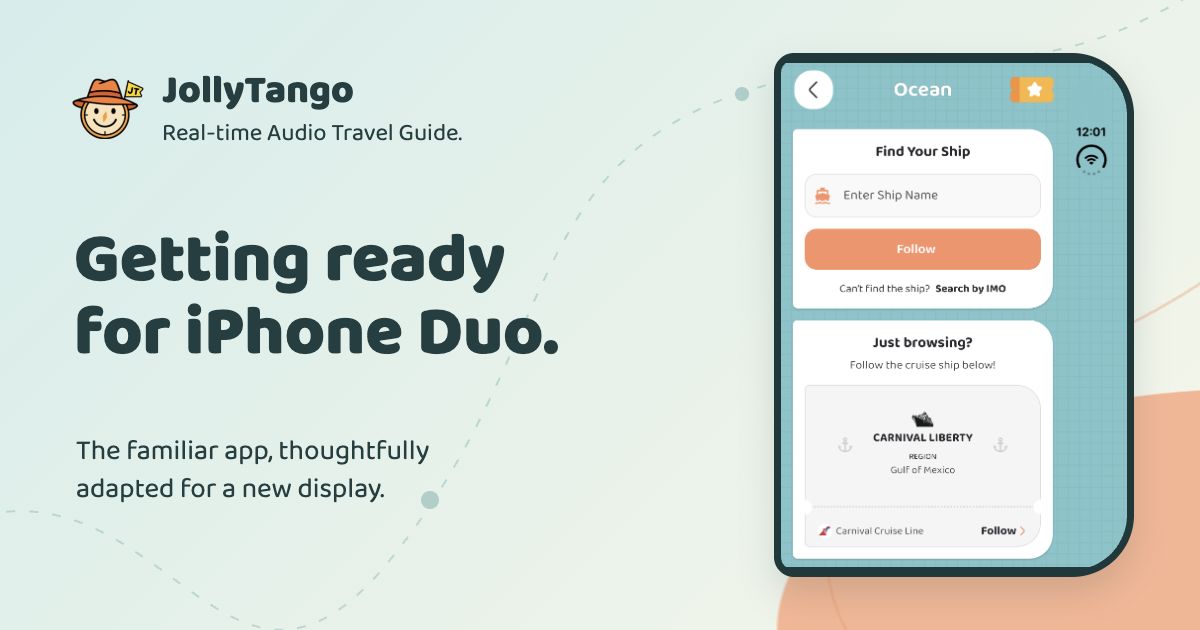
The same app, with more room to explore
We started with the JollyTango people already know: Air, Land, and Ocean, with maps, narration, local information, photos, and games. We wanted those familiar choices to feel comfortable on both the compact outer display and the larger screen inside.
That meant looking at each screen's purpose. A quick flight search needs clear fields and an easy-to-reach Follow button. A longer narration needs comfortable lines of text. Account information needs a straightforward way to scroll through everything.
A larger screen doesn't need a longer button
One of our first lessons was about width. Simply stretching a card across all the available space made short buttons look oversized and left too much distance between a heading, an illustration, and the next action.
We set limits on the width of those sections and brought related content closer together. The extra space can give the page breathing room without asking your eyes to travel across an unnecessarily long line. We kept the regular iPhone design beside us as a reference throughout the work.
Small details matter on the front display
The compact display called for a different set of adjustments. We refined card shapes and checked that photos stayed inside their borders. We also balanced the space around icons and game boards, so the bottom of a card felt as comfortable as the top.
The footer beneath a journey is a good example. The next-update message stays on the left, with Feedback on the right. When space is tight, the feedback icon can carry the action without forcing the footer onto a second line. It's a small change, but it keeps more of the screen available for the journey.
Keep the whole page within reach
Different screen proportions also made us take a fresh look at scrolling. On the Account screen, we kept one continuous page so pass information and settings remain part of the same flow. We adjusted bottom drawers to meet the bottom edge, and reviewed how longer sections scroll when they don't fit at once.
We paid the same attention to the flight and ship tickets. The dotted separator should read as part of one ticket, with enough space around the icons and the Follow action. The goal is to make the familiar ticket comfortable to use at each size.
Testing the details, one screen at a time
Apple's simulator has let us review the running app across the front display, book and tabletop configurations, and the fully open screen in portrait and landscape. We have been checking the actual controls and scrolling, as well as comparing screenshots to catch spacing and alignment issues.
The preview image in this article comes from our simulator testing. We are now finishing our checks and preparing the update for App Store review.
Looking forward to the first journeys
Apple lists October 23 as iPhone Duo's availability date, and we're working toward being there for its first day. We're excited about the possibilities of the new display and about bringing our existing users along, whether they choose Duo or keep the iPhone they already enjoy.
What you hear remains at the center of JollyTango: stories about the places around your trip. You'll still need internet for real-time narration and related information, including Wi-Fi during flights or cruises where available.
Explore Air Mode, Land Mode, or Ocean Mode to see what you can listen to on your next trip.
Questions about JollyTango on Duo
Is the JollyTango Duo update available now?
As of October 13, 2026, the Duo update is in final testing. We're targeting the first day of iPhone Duo availability, October 23, subject to completing testing and App Store approval.
What are you adapting for the two displays?
We're adjusting text and card widths, spacing, scrolling, and controls for the outer and inner displays. Air, Land, and Ocean remain the familiar ways to start a journey.
Will JollyTango still support other iPhones?
Yes. We're preparing Duo support as an update to JollyTango, with the existing iPhone experience as our design reference.
Does JollyTango on Duo need internet?
Yes. Real-time narration and related travel information need an internet connection. Duo's different displays do not change that requirement.