
What to download before a flight.
The easiest time to improve a flight is before boarding. Once you are in the seat, Wi-Fi may be slow, outlets may be limited, and the best window-view moments may pass before you are ready.
A smart download checklist covers practical items like documents and entertainment, but it can also make the flight more curious with maps and audio context for the places below.

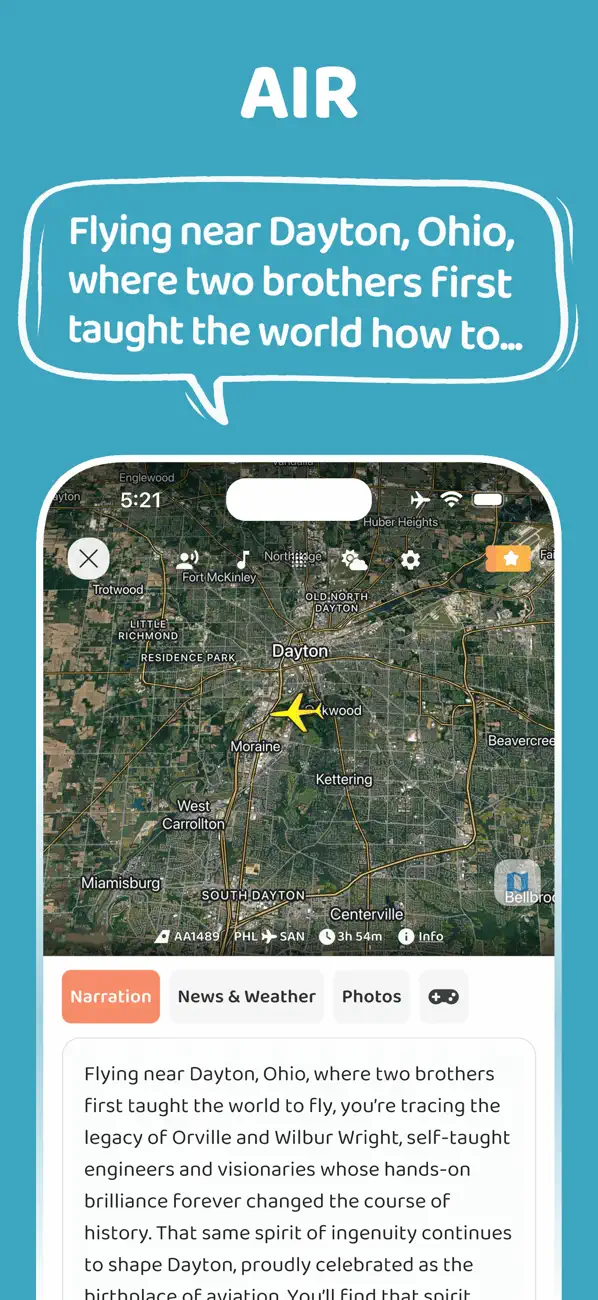
The pre-flight download checklist
- The airline app and boarding pass.
- Hotel, rental car, cruise, train, or tour confirmations.
- Offline entertainment for the full route, not only the first hour.
- Podcasts, audiobooks, or music that work without a strong connection.
- Maps for the arrival city and any long connection.
- A flight audio guide if you want to understand the places below the route.
The FAA traveler page points passengers toward airport status, TSA travel tips, PackSafe guidance, and the 3-1-1 liquids rule. In practice, that means a good flight checklist should cover both digital preparation and what is physically allowed in your bags.
Do the battery and security check before leaving home
Power banks and spare lithium batteries need attention before you pack. FAA PackSafe guidance says spare lithium batteries and power banks must be carried in the aircraft cabin and removed from any bag that gets checked at the gate or planeside.
For liquids, TSA still uses the 3-1-1 rule for common carry-on items such as toothpaste, shampoo, conditioner, mouthwash, and lotion. If you wait until the security line to sort this out, the whole airport experience becomes harder.
Download something that makes the route interesting
Most travelers download things to distract themselves from the flight. That is useful, but you can also download or prepare tools that make the flight itself more interesting.
- Look up whether the route is likely to pass mountains, coastlines, rivers, or major cities.
- Check whether in-flight Wi-Fi is available on your aircraft.
- Choose a window seat if the daylight route is scenic.
- Keep headphones ready before takeoff instead of digging for them later.
Add flight-path stories to the setup
JollyTango Flight mode turns the flight path into audio stories about cities, rivers, mountains, coastlines, landmarks, and local context below the route.
It works best with an internet connection such as in-flight Wi-Fi, so add it to your pre-flight setup along with headphones, charging, and the airline Wi-Fi details.
Pre-flight documents, battery, and security sources
Make your next flight less empty.
Use JollyTango Flight mode to hear stories about the places below your flight path.
Explore Flight mode